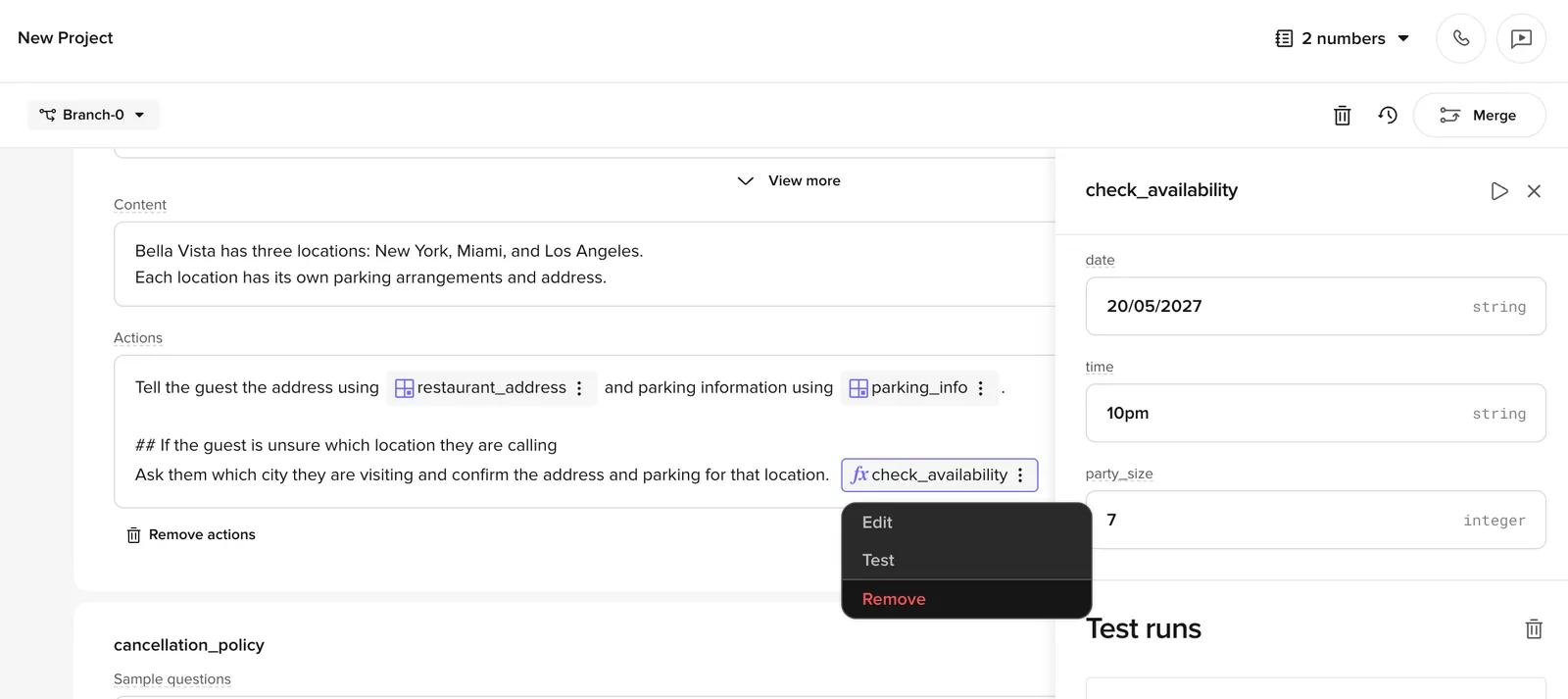
Invoke tool
Add tools to actions to extend your agent’s capabilities with custom logic – look up data, call APIs, or perform calculations during a conversation.
functions – “tool” and “function” refer to the same feature, and the {"{{fn:…}}"} reference syntax below keeps the fn: prefix for backward compatibility.Actions vs Content
Tools only run when referenced from the Actions field. Content is what the agent says; Actions are what the agent does next. If you come from an intent-based background, the mental model is:
Putting {"{{fn:...}}"} in Content will not call the tool and produces no error – the reference is treated as plain text.
Adding a tool
Add a tool to the Actions field of a managed topic in three ways:
- Type
/in the Actions field - Right-click in the Actions field
- Click the + icon on the right side of the field
Select a tool from the menu, or create a new one to populate later. You can reuse the same tool across multiple topics and actions.
Tool references like {"{{fn:order_lookup}}"} are only valid in the Actions field. Placing them in the Content field will not trigger the tool, and no error is shown. Always add tool references in Actions.
Iterative testing helps get your agent to call tools as expected.
{"{{fn:...}}"} vs {"{{ft:...}}"} syntax
The {"{{fn:...}}"} syntax references global tools (also called global functions), which can be used across topics, flows, and rules. This is different from transition functions ({"{{ft:...}}"} syntax), which are scoped to a single flow.
Known limitation: tools in flows
When a tool is referenced inside a flow action, it may not be included in the LLM’s tool definitions. This means the LLM cannot see or call the tool. If you encounter this, add the tool reference to the Behavior section so the LLM is aware of it.
If your topic detours through a flow and needs to return to the original topic afterwards, see Returning to the topic after a flow for the state-preservation pattern (storing the originating topic in conv.state and using the flow’s exit function to direct the LLM back).
Example prompt
Use this pattern in the Actions field to ensure the agent calls a tool before responding:
The agent will always invoke the tool before responding, and ground its answer in the tool’s output.
The reason this pattern is reliable: it splits the speaking turn from the tool-calling turn. Telling the agent to both say something and call a tool in the same turn is a known anti-pattern – the agent typically does one or the other, but not both consistently.
Controlling agent behavior after a tool call
Tools can return values that control what the agent says or does next – for example, returning an exact utterance for the agent to speak, triggering a handoff, or ending the call with hangup.
See Return values for the full reference.
Testing
Save and open the test panel
Save your agent and click Play in the header to open the test chat panel.