

Triggering flows
This page requires Python familiarity for the programmatic examples. Non-technical operators can trigger flows from FAQs actions without writing code – see Start a flow from a FAQs action below. All code-focused content is also available in the Developer tab.
A flow starts when something calls conv.goto_flow("Flow name"). This may happen through a FAQs action or programmatically inside a function.
This page explains how conv.goto_flow can be used:
You can call conv.goto_flow(...) from any function in Agent Studio, including:
Example:
What happens:
- The function runs during the current turn.
- When the turn completes, the agent enters the named flow.
- The flow begins at its configured start step.
Start a flow from a FAQs action
A Managed Topic can trigger a flow when it matches a user request. This is the primary way to collect entities from a topic, since FAQs do not support entity extraction directly.
Using the /Flow shortcut (no code)
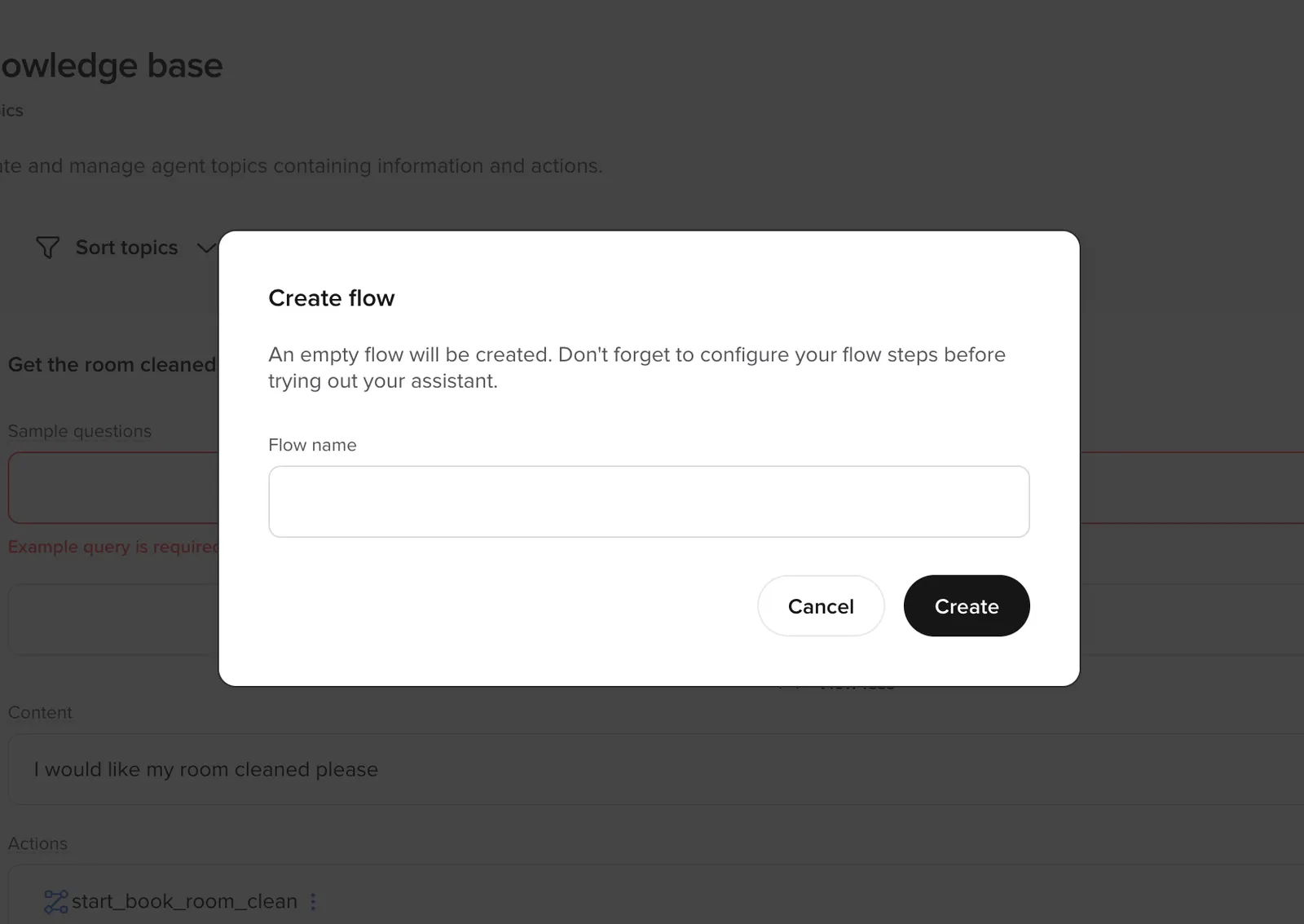
Inside a FAQs Actions field, type /Flow and use the (+) option to create or attach a flow. When the topic matches, the agent enters the selected flow at its start step.
No custom function is required if you just need to enter the flow.
Using a tool call from a topic
If you need additional logic before entering the flow – for example, storing context so the agent can return to the topic afterward – use a tool call action instead:
You can also trigger a flow from a global function by calling conv.goto_flow() directly.
Returning to a topic after a flow
When a topic triggers a flow (e.g. to collect a date or verify identity), the agent can return to the original topic content after the flow exits. To do this:
- Before entering the flow, store the topic name in state (e.g.
conv.state.original_topic). - In the flow’s exit function, check the stored topic and return a prompt that directs the LLM to the relevant topic content:
What is an “exit function”? There is no special “exit function” step type. An exit function is just a transition function on the final step of the flow that calls conv.exit_flow() and returns a payload (typically {"content": ...} or {"utterance": ...}). It runs because the step runs — not because the flow registers an “on-exit hook” — and its return value becomes the function output the agent uses next. Mutating conv.state from inside it is the same as from any other function: conv.state["is_verified"] = True (or conv.state.is_verified = True) takes effect immediately and persists across subsequent turns.
This pattern avoids a generic “Is there anything else?” when the caller’s original question has not yet been answered.
Common mistakes
conv.goto_flow() only queues a transition — it does not pause your function, run the target flow inline, and resume. The flow runs on subsequent turns. The following anti-patterns all stem from forgetting that.
Anti-pattern: checking the verification result inline after goto_flow().
Why it fails: conv.goto_flow(...) returns immediately and the rest of the function executes on the same turn — before the verification flow has had a chance to run. Any code that reads the result of the flow on the same call will see stale or undefined values.
Correct pattern: store context, call conv.goto_flow(...), return — and resume in the flow’s exit function:
Inside the verification flow, its steps set conv.state["is_verified"] (and any other context). The flow’s exit function reads that state and routes back:
Anti-pattern: if conv.state.is_verified == False:
When is_verified has never been written, conv.state.is_verified returns None, not False. None == False is False, so the guard is silently skipped and the unverified user falls through to the protected code.
Anti-pattern: mutual recursion between a protected function and its guard.
Why it fails: on the first (unverified) call, identify_and_verify_user queues goto_flow and returns a string — but execution never comes back into check_account_balance on this turn, so callers reading the return of check_account_balance get None or the verification string instead of a balance response.
Correct pattern: only the entry point calls goto_flow + return. Post-flow resumption is done in the target flow’s exit function, not by calling the original function recursively.
Preventing verification loops
A protected function that calls conv.goto_flow("Identify & Verify User") whenever conv.state.is_verified is falsy will keep sending the user back into verification — every turn, forever — unless two things are true:
- The verification flow writes
is_verified = Trueon the success path. - The protected function has a terminal branch for repeated failures.
Skip either one and the caller is trapped in the loop. The walkthrough below sets up both halves of the fix.
Hand off cleanly from the protected function
The entry point stores any context the flow will need on resume, calls conv.goto_flow(...), and returns. It must not try to read the verification result on the same turn — goto_flow only queues the transition.
Set is_verified on success and escalate after repeated failures
Inside the verification flow, a transition function on the verification step compares user input to the expected value. On success it writes is_verified = True; on failure it increments an attempts counter and routes to escalation once the counter hits 3.
Without the success-path write, the protected function’s is_verified check stays falsy and the loop repeats on every turn.
For the in-flow version of the same escalation pattern — when the failure happens inside a flow rather than at a protected entry point — see Escalating after repeated failed verification below.
Start or switch flows from inside another flow
Once a user is inside a flow, most movement should happen using flow.goto_step(...).
That keeps the user inside the same workflow and branches to another step.
However, sometimes you need to switch to an entirely different workflow.
Examples:
- The user fails identity verification and must enter a verification flow.
- The user requests a human agent and must enter an escalation flow.
- A compliance rule requires a separate structured process.
- The user changes intent entirely (e.g., from booking to cancellation).
In these cases, start a new flow instead of branching.
You do this by calling conv.goto_flow("Flow name") from a function inside the current flow.
Example: Escalating after repeated failed verification
Imagine a booking flow where the user must confirm their date of birth. If they fail verification too many times, you want to move them into a dedicated verification flow.
flow.goto_step(...) call is executed Routing based on API results
Main article: conv.api
A function may call an API using conv.api.
After receiving a response, explicitly choose one of two actions:
- Stay in the current workflow using
flow.goto_step(...) - Switch workflows using
conv.goto_flow(...)
Example: