

Tutorial: Create a project
Lesson 1 of 6 – Create your first project in Agent Studio. This takes about 5 minutes, and the name you choose matters more than you’d think.
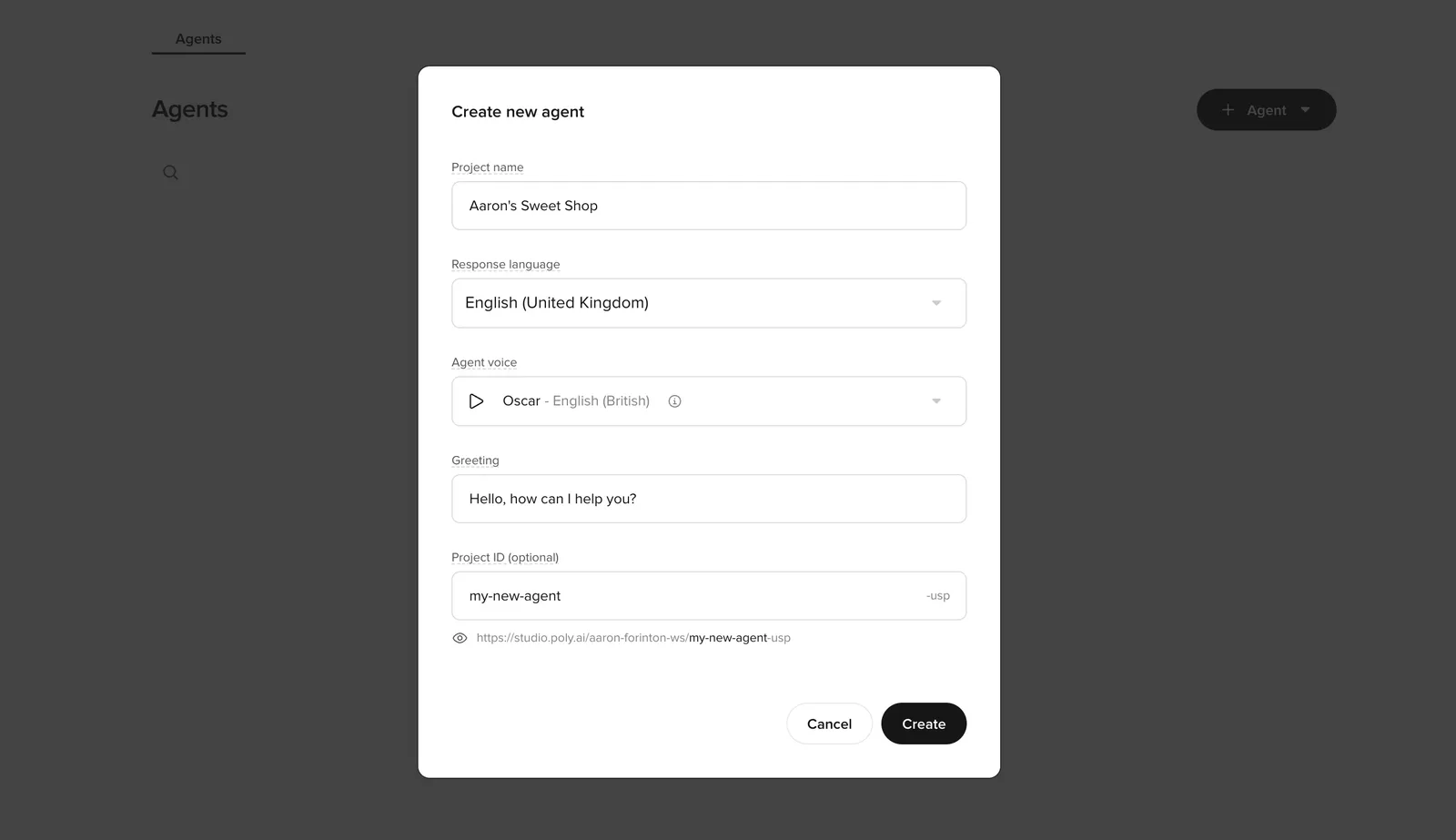
Create the agent
Configure your agent settings
Fill out the fields carefully (these become your default baseline for all later testing):
Project name
Use a clear, descriptive name that won’t become misleading later.
Good examples:
Acme Support AgentWebchat L1 TriageHotel Concierge (US)
Avoid:
TestNew agent- Names that explicitly reference an environment (
Sandbox,Prod,Live)
Response language
Select the primary language/locale your users will interact in.
Agent Voice
Pick a reasonable starter voice. You can always change this later.
Greeting
Keep it short and broadly reusable.
- Aim for one sentence that works for both chat and voice
- Example:
Hi–how can I help today? - Avoid over-specific or wordy greetings
Project ID (optional)
Treat this like a stable identifier. It appears in the project URL inside Agent Studio, with an environment suffix appended automatically. If you leave it blank, Agent Studio generates one for you.
Once set, the Project ID cannot be changed. Choose carefully – every bookmarked URL and API call will include this ID forever.
Allowed characters: alphanumerics and dashes only (a-z, A-Z, 0-9, -).
Examples:
my-shop-support-l1hotel-concierge-us
Check your understanding
Why should you avoid naming a project 'Test' or 'New agent'?
- The name appears in the live greeting, so a vague name sounds unprofessional to callers
- Generic names cause confusion as you add environments and variants
- The name is permanent and cannot be changed after the first publish
- Agent Studio assigns the Project ID from the name, so a generic name creates a confusing URL
Answer: Generic names cause confusion as you add environments and variants
Generic names like ‘Test’ or ‘New agent’ become confusing when you have multiple agents in your account. Use a clear, descriptive name from the start – something like ‘Hotel Concierge (US)’ stays meaningful as you scale.
Confirm the baseline workspace
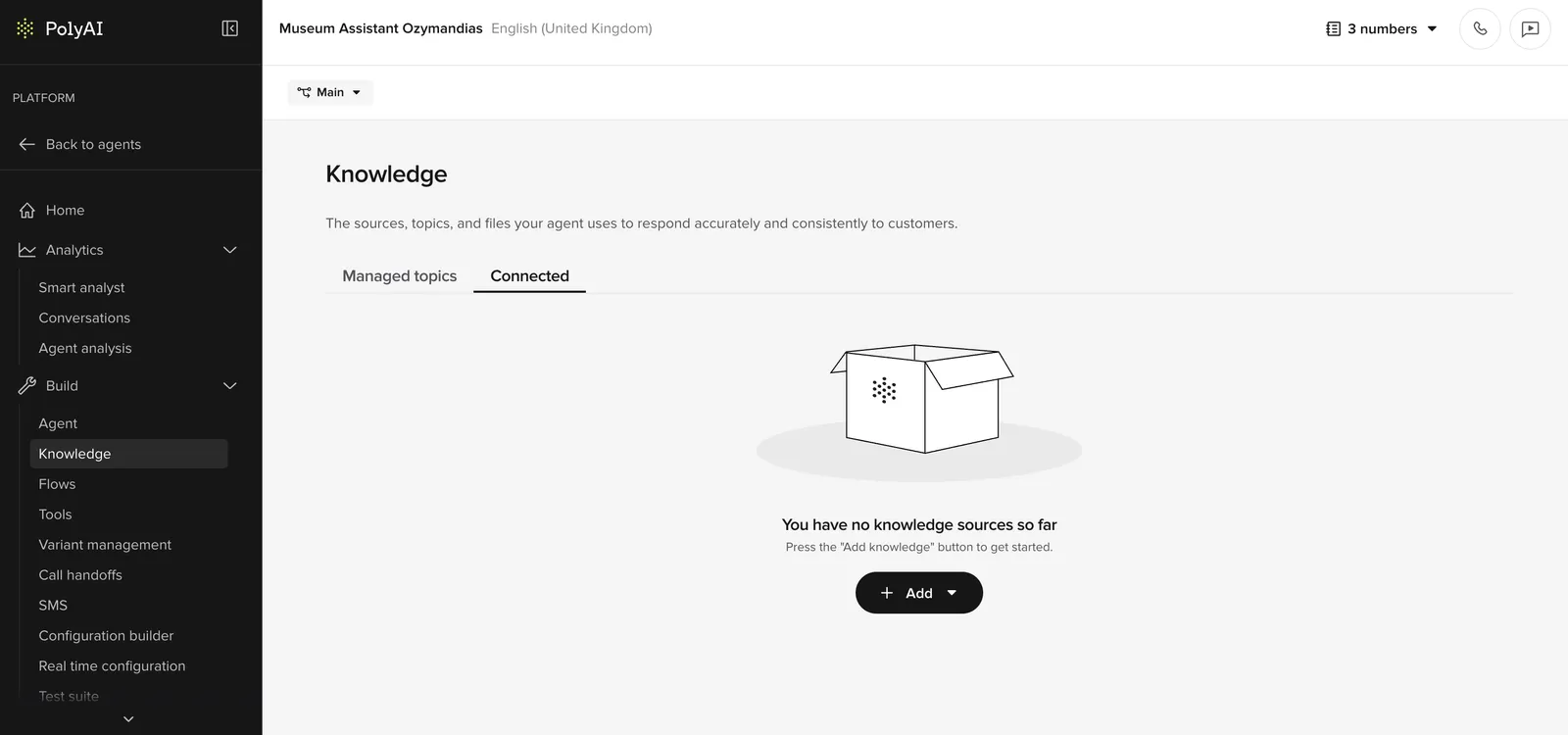
After creation, you land in the Knowledge area – empty state with an Add topic button.
Agent Studio interface
The right sidebar toggles open/closed for quick access to testing tools.
Confirm agent identity
- The header shows the agent name and language.
- The agent is in Draft state.
Verify
Success criteria:
- The project loads without errors and stays stable across page changes.
- You can access (at minimum):
- Behavior > General (personality, role, Behavior)
- Knowledge
- Knowledge > Variants
- Voice > Settings
- Deployments
- The Knowledge page shows an empty state with a clear call to action (for example, Add topic), indicating you’re ready for the next steps in the checklist.
Check your understanding
You're naming a new Agent Studio project. Which of these is a bad choice?
- Acme Support Agent
- Linden Hotel Concierge
- Hotel Concierge (US) – Live
- Webchat L1 Triage
Answer: Hotel Concierge (US) – Live
Including an environment name like ‘Live’ in the project name is a problem – the same project runs across Sandbox, Pre-release, and Live. A name tied to one environment becomes misleading in the others.
Try it yourself
Challenge: Name your agent
You’re building a hotel concierge agent for “The Linden Hotel”. Write out:
- A project name
- A project ID
- A one-sentence greeting
Hint
The project name should be descriptive but not reference an environment. The project ID should be stable and URL-friendly (lowercase, hyphens). The greeting should work for both chat and voice.
Example solution
Project name: Linden Hotel Concierge
Project ID: linden-hotel-concierge
Greeting: Hi, welcome to The Linden Hotel – how can I help you today?
Check your understanding
You named your Project ID 'test-1' six months ago. Now your team has multiple agents and everyone bookmarks Agent Studio URLs. What problem will you hit?
- The agent will stop working because ‘test-1’ is a reserved name
- The Project ID is embedded in the URL – a vague ID like ‘test-1’ makes it hard to tell which agent a URL points to
- You’ll need to re-authenticate every time you open the project
- The ID will conflict with the environment name and block promotions
Answer: The Project ID is embedded in the URL – a vague ID like ‘test-1’ makes it hard to tell which agent a URL points to
The Project ID determines the project’s URL inside Agent Studio and cannot be changed once set. A vague ID like ‘test-1’ becomes confusing when you have multiple agents – every bookmarked URL looks meaningless and you can’t rename it later. Choose a descriptive, stable ID from the start (e.g., ‘linden-hotel-concierge’).
Project IDs must be URL-friendly. In an ID like “linden-hotel-concierge”, words are separated by _____.
Answer: hyphens, hyphen, -
Go deeper
Want more detail on any of the concepts in this lesson? These reference pages cover the same features in depth: